Anyone can become a user of Academic Library after completing application from, submitting ID and paying CzK 200 for a membership card. The fee for additional years is CzK 100 per year.
Search the online catalogue (using computers located around the copy machines on both floors) to get the particular call-number. The 1st five digits denote the scientific field and the next four digits indicate the book position within this field. Use the floor plan to get to the desired field/shelf.
Fiction can be found on the first floor of the library, arranged alphabetically by author's surname. It is further divided by language. Fiction is arranged in the same way in the Austrian Library (the second floor of the Academic Library).
The most frequently borrowed theses from the period between 1995 and 2007 are displayed on the second floor of the library. Newer theses are available in PDF format on the internet (STAG). Older and less frequently borrowed theses are stored in the library repository and you can request them at the circulation desk. All theses are available for on-site use only.
Journals are placed in journal studies on both floors and are available for use on site or for borrowing (maximum loan period is 7 days). Older journal volumes must be requested from the library depository.
This is possible if the book has not been booked by another reader and you have not exceeded the loan period. First, log in to the online catalogue (using your STAG username and password) and then click “My Library Account”. Click the number of your loans and you will get a list of your loans and their due dates.
If you want to extend the loan period for only some of your books, select them at the beginning of the line and click on "Extend selected" at the top. If you want to extend the loan period for all your books, select "Extend all."
You can only reserve books that are currently on loan. Please note that it is not possible to reserve books that are in department libraries (marked as "deposit" in the Academic Library catalogue) and books that are marked as "staff loan." You can reserve books through the online catalogue.
Click on the ‘Online catalogue’ link on the Academic Library page HERE, or select ‘Online catalogue’ via the ‘Catalogues and databases’ link.

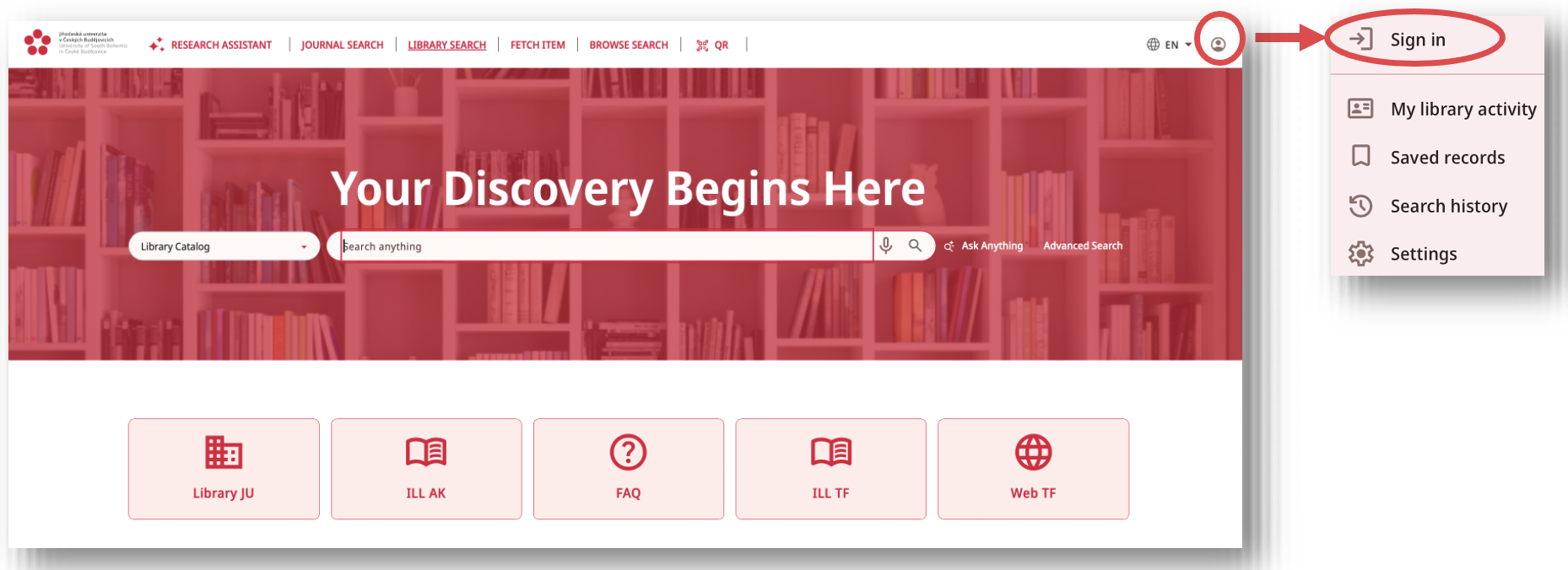
On the catalogue page, click on the ‘User’ icon, select ‘Sign in’.
Click to view the image
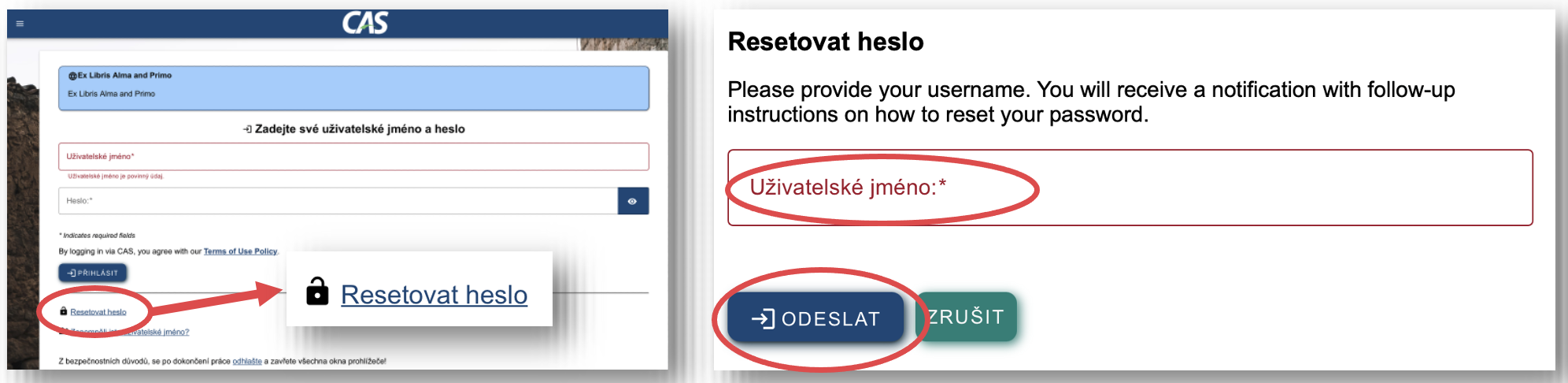
On the CAS page, click on “Reset Password”, enter your username (the part before the @ in your email address, e.g. “smithj”) and click “SUBMIT”.
Click to view the image
You will receive an email with a link from “
Click to view the image
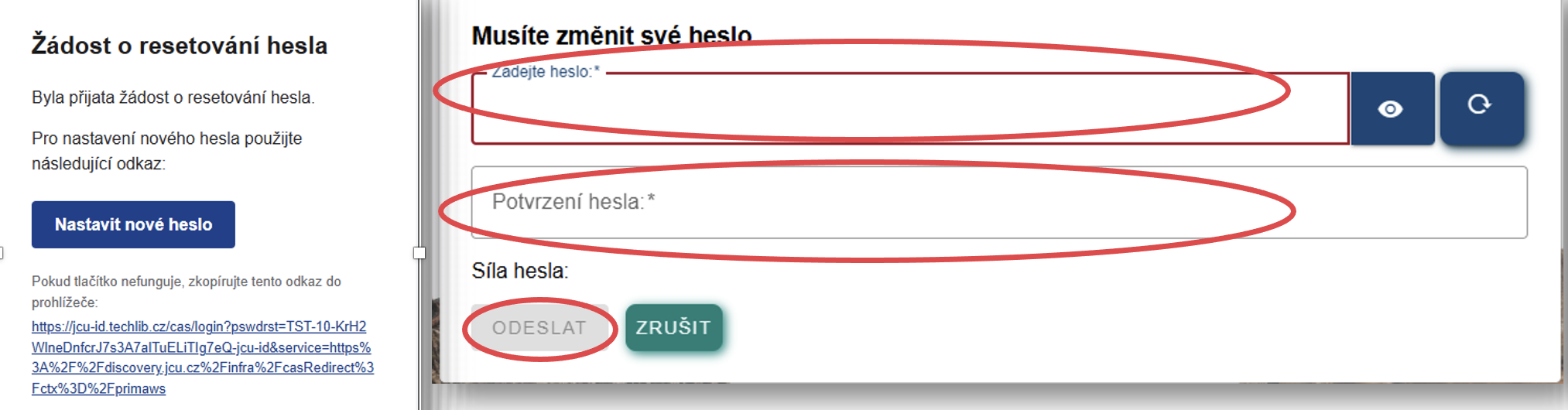
The next time you log in via CAS, you will simply enter your username and password.
On the catalogue page, click on the ‘User’ icon, select ‘Sign in’.
Click to view the image
On the CAS page, click on “Reset Password”, enter your username (the part before the @ in your email address, e.g. “smithj”) and click “SUBMIT”.
Click to view the image
You will receive an email with a link from “
Click to view the image
The next time you log in via CAS, you will simply enter your username and password.
You can find pictorial instructions HERE
Yes, details about these services, including instructions, can be found HERE.
No, because the meal account and the printing account are separate. You can recharge your card using the machine on the ground floor of the library. Free scanning is also available. Any further transfers of funds are possible in STAG.
These books are intended for reference use only in the library. On the 1st floor, they are marked in red, and on the 2nd floor, in green.
Yes, it is possible. All requests submitted in person or sent by email are then reviewed by the library's acquisition committee. Requests can also be submitted to the library via an online form.
The loan periods for documents depend on the reader category and the document type. For more information on this topic, see LIBRARY RULES
There are several possible ways to replace a lost document. Detailed information can be found in LIBRARY RULES
Penalty fees are based on the reader category. Students and the general public pay CzK 2 per document per day of delay. For more information, see LIBRARY RULES
Yes, this is what the Interlibrary Loan Service (ILL) is for, and it is free of charge for students and employees of the University of South Bohemia. You can request this service using the “ILL Request” tab in the online catalogue (after logging in).
Of course, you can use your own laptop/tablet and there is a Wi-Fi connection available in the library. Please use your devices in silent mode in quiet study rooms. The use of mobile phones is prohibited in quiet study rooms.
This is done using remote access, known as a VPN concentrator. Each user must set this up individually using the INSTRUCTIONS. You will then have access to the EZB and all databases marked as available for “AK-JU” in the alphabetical list.
Theses and Dissertations – Frequently Asked Questions
Theses and dissertations of the University of South Bohemia can be searched in three main sources:
- IS/STAG– the main and most up-to-date source
- Online Library Catalogue (OPAC) – records up to 2024
- USB Repository (DSpace) – selected works available in full text
We recommend using IS/STAG.
Theses are available here immediately after the defence, including supervisor and reviewer reports.
Electronic theses have been available in IS/STAG since 2006.
Theses are submitted exclusively in electronic form via IS/STAG.
Students enter the required information and upload the full text of their thesis.
Yes. After submission, theses are automatically checked using the Theses.cz system.
Yes, but under certain conditions.
The use of AI is regulated by the Rector’s Directive:
👉 Rector’s Directive on the Use of AI
Students are required to:
- familiarize themselves with this directive
- follow faculty rules and the instructions of their supervisor
- transparently acknowledge the use of AI in their thesis
Yes, older theses are available in print at the Academic Library:
- The most frequently borrowed theses from approximately 1995–2007 are available on display on the 2nd floor of the library.
- Older and less frequently borrowed theses are stored in the repository – you can request them at the circulation desk.
Since 2018, theses have been submitted in electronic form only.
All theses are available for in-library use only.
Printed theses from storage can be requested at the circulation desk.
No. The Online Catalogue (OPAC) contains processed theses only up to 2024.
Theses defended from 2025 onwards are no longer catalogued in OPAC.
The USB Repository (DSpace)
👉 DSpace USB
contains theses in full text and other publications of the University of South Bohemia.
Theses are added with a time delay.
Habilitation theses are not recorded in IS/STAG.
They are available only in DSpace:
👉 DSpace USB


